


Make Mobile-Friendly Ads Using the Ad Maker Tool
If you’ve ever scrolled through TikTok, Instagram, or YouTube Shorts, you know how quickly people swipe. You only have a few seconds to grab their attention before your ad disappears into the endless stream of content. Here’s the hard truth: most ads fail on mobile because they weren’t designed for small screens. That’s why creating mobile-friendly ads isn’t optional anymore it’s the only way to stay competitive.
Every detail matters, from making sure your text isn’t cut off to adjusting video formats for vertical viewing. The good news is you don’t need expensive agencies or complicated editing software to do this. With tools like Pippit AI’s ad maker, you can crop video, style it perfectly for mobile, and publish professional-quality ads in just minutes.
In this blog, we’ll explore why mobile-friendly ads are critical, the common challenges businesses face, and how to use Pippit’s ad maker step by step to design ads that look sharp, build trust, and actually convert.

Why mobile-friendly ads directly impact your sales
More than 70% of all online content today is viewed on mobile devices. That means most people who see your ad aren’t on a laptop they’re on their phones while commuting, relaxing, or scrolling at night. If your ad isn’t designed for mobile, here’s what usually goes wrong:
-
The video looks too small because the aspect ratio wasn’t adjusted.
-
Captions or text are cut off since they weren’t optimized for vertical formats.
-
Black bars or empty space make the ad look unprofessional.
These small mistakes break trust instantly. Customers don’t pause to figure out what went wrong they just swipe past. On the other hand, mobile-friendly ads blend into the feed, look polished, and deliver your message within seconds. That’s the difference between being ignored and being remembered.
The hidden struggles of designing for mobile
At first glance, creating ads for mobile phones seems simple. But many business owners and even agencies run into hidden obstacles.
-
Platform differences: Instagram feed posts perform best in 1:1, Facebook ads in 4:5, TikTok and Reels in 9:16. Without proper cropping, your ad can look awkward or get key visuals cut off.
-
Design details: Fonts that look great on desktops often appear too small on phones. Misaligned text or cluttered backgrounds are more noticeable on smaller screens.
-
Time pressure: Small businesses rarely have hours to resize, reformat, and edit every ad manually.
This is exactly why AI-powered tools like Pippit’s ad maker are game-changers. They handle technical formatting while keeping your ad professional and aligned with your brand.
Step-by-step: how to create mobile-friendly ads with Pippit
One of the best parts about Pippit is how simple it makes the ad creation process. You don’t have to juggle multiple apps. Everything from cropping to editing is built into one platform. Here’s how you can use the ad maker tool in three easy steps:
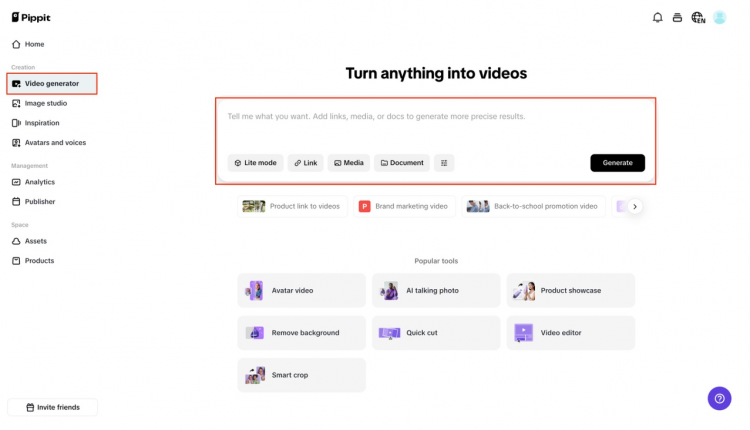
Step 1: Click on “Video generator”
Head to the Pippit homepage, open the Video generator, and enter your product link or upload clips. You can also personalize with Avatar, Script, or Voice to give your ad a unique touch.
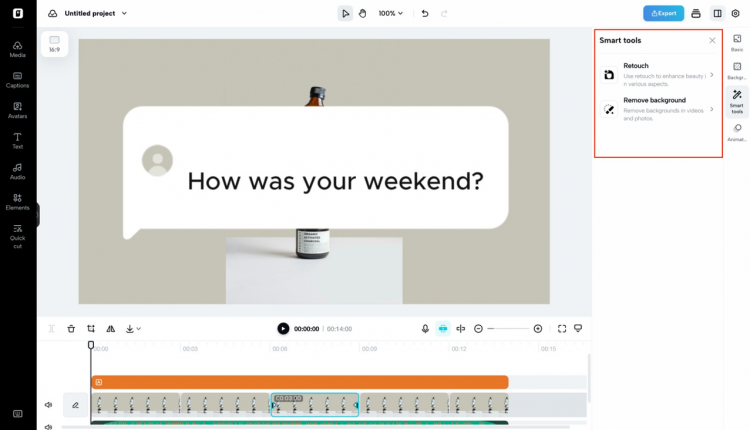
Step 2: Improve your video with AI tools
Use built-in features like Auto Reframe, Retouch, Overlay, and Remove Background to polish your ad. You can also tap into the AI lyrics generator to add synced lyrics or captions, making your ad engaging and accessible.
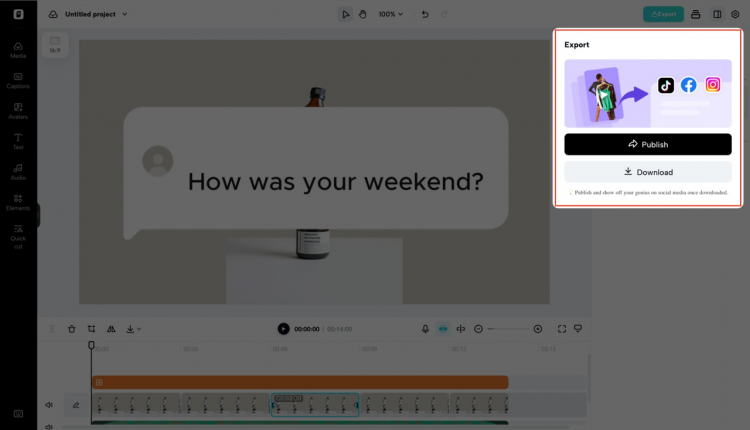
Step 3: Preview and export your video
Preview how your ad looks across platforms, make final tweaks, and hit Export. You can download it in multiple formats or share it directly to TikTok, Instagram, or YouTube.
Why resizing ads for each platform matters
A common mistake small businesses make is creating one video ad and posting it everywhere. While this saves time, it often reduces performance. Why? Because each platform favors different formats.
-
TikTok and Reels thrive on 9:16 vertical full-screen videos.
-
Instagram feed posts look clean in 1:1 square format.
-
Facebook ads perform better in a 4:5 portrait.
-
YouTube ads need 16:9 widescreen.
With Pippit’s crop video feature, resizing for each platform is quick and painless. You don’t lose quality, and your ads look natural in every feed. Optimized formats also signal to platform algorithms that your content is tailored for users, improving reach and engagement.
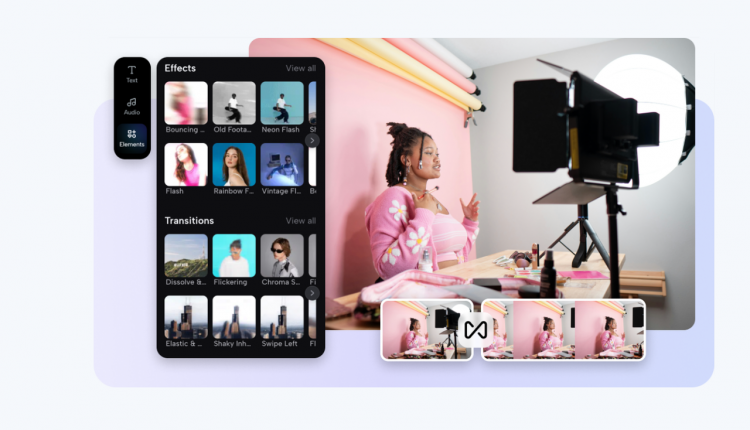
How AI helps you design faster and smarter
Mobile-friendly ads aren’t just about size they’re about impact. But creating impactful ads manually takes time. That’s where AI steps in.
With Pippit’s AI tools, you can:
-
Automatically frame products to stay in focus.
-
Add branded overlays that match your colors and fonts.
-
Retouch visuals so they look professional.
-
Quickly swap backgrounds for seasonal or themed campaigns.
Instead of spending hours on editing, you can focus on creativity and messaging. AI handles technical design, ensuring every ad looks professional without stress.
Making ads that blend into feeds
The best mobile ads don’t scream “advertisement.” They blend into the platform while still capturing attention. Here’s how to achieve that effect:
-
Keep text short and easy to read.
-
Stick to under 15 seconds for TikTok and Reels.
-
Always add captions for silent viewing.
-
Highlight your product within the first three seconds.
Pippit’s ad maker is designed with these best practices in mind, making it easier to create ads that feel natural to mobile users but still drive clicks and conversions.
Building trust and sales with professional ads
Customers judge brands quickly. An ad that looks sloppy or poorly formatted can make even a great product seem unreliable. On the flip side, professional, consistent ads send a strong message: We take our business seriously.
With Pippit, you can create ads that are always polished, consistent across platforms, and tailored for mobile viewing. Over time, this consistency builds trust, improves brand recognition, and turns casual clicks into real sales.
Final thoughts
Creating mobile-friendly ads doesn’t have to be complicated or time-consuming. With Pippit AI’s ad maker, you can crop video for any platform, enhance visuals with AI tools, and even use the AI lyrics generator to sync music or captions perfectly. All of this happens in just a few clicks.
The result? Your ads fit perfectly into feeds, look professional, and get attention where it matters most on people’s phones. You save time, save money, and create campaigns that rival big brands.
If keeping up with mobile ad design has felt overwhelming, now’s the time to simplify. With the right tool, you don’t have to worry about formatting or edits. Instead, you can focus on what really matters: telling your story, engaging your audience, and growing your business.

Comments are closed.